
 English
Views: 0 Author: Site Editor Publish Time: 2026-04-23 Origin: Site


Over the past decade, offices have shifted from rows of identical cubicles to a much richer mix of spaces designed to help people think, learn, and work together. Collaborative workspace ideas are now central to how organizations innovate, share knowledge, and build culture. For project contractors, interior designers, and distributors, this shift has changed the brief: it is no longer enough to deliver a “sea of desks.” Modern clients want spaces that actively enable co-creation, problem-solving, and hybrid teamwork.

This article aims to give you a structured, practical guide to collaborative workspace ideas that move beyond trend-driven aesthetics. We will look at the main types of collaborative spaces, the design principles that make them work, and the furniture and technology choices that support different collaboration styles—from quick stand-up huddles to multi-day project sprints. The goal is to provide a toolkit you can apply directly in real-world projects and specifications.
The main body of this article is organized in a way that mirrors a typical workplace strategy or fit‑out project. We start with core concepts, defining what collaborative workspaces are and why they matter in modern organizations. We then move into typologies and use cases, mapping common space types to activities and team sizes.
From there, we turn to design principles, including layout, furniture, technology, acoustics, and inclusivity, with a dedicated section using bullet points as a practical checklist. We follow this with concrete furniture ideas that enable collaboration and a section focused on hybrid and remote teams. Finally, we look at budgeting, phasing, and implementation for B2B projects, so you can move from collaborative workspace ideas to a deliverable plan.
This structure is designed for professional stakeholders—interior designers, workplace strategists, corporate leaders, and B2B procurement teams—who need an actionable framework they can adapt across different clients and portfolios.

Collaborative workspaces have emerged as a direct response to the limitations of traditional office layouts. The old model of long rows of fixed desks and isolated private offices made it hard for teams to share knowledge quickly or work together fluidly. Collaborative workspace ideas focus on creating environments that make it easier for people to solve problems, share ideas, and co‑create value.
In practical terms, a collaborative workspace is any area intentionally designed to support people working together. It might be a project room used by one team for months, a casual lounge where spontaneous discussions happen, or a technology-rich room where local and remote colleagues meet. The common thread is intentionality: these spaces exist to support collaboration as a core activity, not as an afterthought.
Office design has evolved in distinct waves. First, we had the era of cubicles: high partitions created privacy and focus but limited visibility and interaction. Then came open plans, which removed many physical barriers but often introduced noise, distraction, and a lack of defined purpose.
Today, leading organizations are moving toward hybrid, activity‑based layouts. In these environments, you still find places for individual focus work, but they are complemented by social zones, collaboration hubs, and specialized rooms for learning and project work. The central idea is to offer different space types for different tasks, allowing people to choose where and how they work.
For knowledge work, this balance between face‑to‑face interaction and quiet, individual focus is critical. Too much openness leads to constant interruption; too little interaction slows decision‑making and innovation. Collaborative workspace ideas, when executed well, help organizations strike the right balance.
Several characteristics distinguish a true collaborative workspace from a simple breakout area. First, there is shared access: multiple people can use the space at the same time for structured or semi‑structured work. Second, the layout is flexible—furniture can often be moved or reconfigured to support different modes (discussion, presentation, workshop, etc.).
Third, the tools needed for collaboration are visible and easily available: whiteboards, pin‑boards, digital displays, or shared devices. Finally, there is a cultural expectation that this area is for teamwork—people come here to work with others, not just to check email. This intent and infrastructure set collaborative workspaces apart from generic social zones or café areas.

When collaborative environments are thoughtfully designed, they offer several benefits. Decisions can be made faster because the right people can gather with the tools they need. Culture is strengthened as cross‑team relationships grow and informal conversations become more frequent. Space is used more efficiently, with each area supporting specific activities rather than serving as a one‑size‑fits‑all environment. Innovation tends to increase, because people have more opportunities to share ideas, test concepts, and iterate together.
However, collaborative workspace ideas also introduce risks if they are not controlled. Poorly planned spaces can become noisy, distracting, or visually chaotic. People may feel pressure to always be “on” and visible, leading to collaboration overload and reduced focus time. These pitfalls can be mitigated through careful zoning, acoustic planning, and clear etiquette about how and when to use different spaces.
Not all collaboration is the same. A high‑stakes board meeting, a daily stand‑up, and a casual peer coaching conversation all require different settings. A robust collaborative strategy therefore relies on a mix of space types, each tuned to specific activities and team sizes.
Project rooms and innovation labs are dedicated spaces used by a specific team or initiative for extended periods. They are typically equipped with flexible furniture—mobile tables, stackable chairs, writable walls—and technology such as large screens, video conferencing, and digital whiteboards.
These spaces are ideal for product development, consulting projects, transformation programs, and any work that benefits from continuity. The team can leave materials up on the walls, maintain a stable layout, and return each day to a space that reflects their current thinking. Compared with booking standard meeting rooms, project rooms support deeper work and stronger collective memory.

Huddle spaces, meeting rooms, and boardrooms form another key family of collaborative workspaces. Huddle spaces are typically designed for 2–6 people, often with a small table, a screen, and some level of acoustic control. They are perfect for quick check‑ins, one‑to‑ones, and small group problem‑solving sessions.
Formal meeting rooms handle medium‑sized groups and a wider range of session types, from workshops to client presentations. They usually require more sophisticated AV setups and more flexible furniture arrangements. Boardrooms, at the top end, are reserved for high‑stakes decision‑making and external guests. They often feature premium finishes, advanced AV, and carefully considered sightlines and acoustics.
Across all three types, differences in room size, privacy, and technology reflect different collaboration needs—including the growing requirement to support hybrid meetings with remote participants joining by video.

Cafés, teapoints, work lounges, and “collision spots” (like stair landings and widened corridors) provide a more informal type of collaborative workspace. These third spaces are not usually booked; instead, they host spontaneous encounters and ad hoc conversations.
Well‑designed social zones support culture and cross‑team connections. People who rarely attend the same formal meetings may bump into each other over coffee and exchange ideas that would not emerge in scheduled sessions. Low‑pressure conversations in these settings often feed creativity, as individuals feel more relaxed and less constrained by meeting agendas.
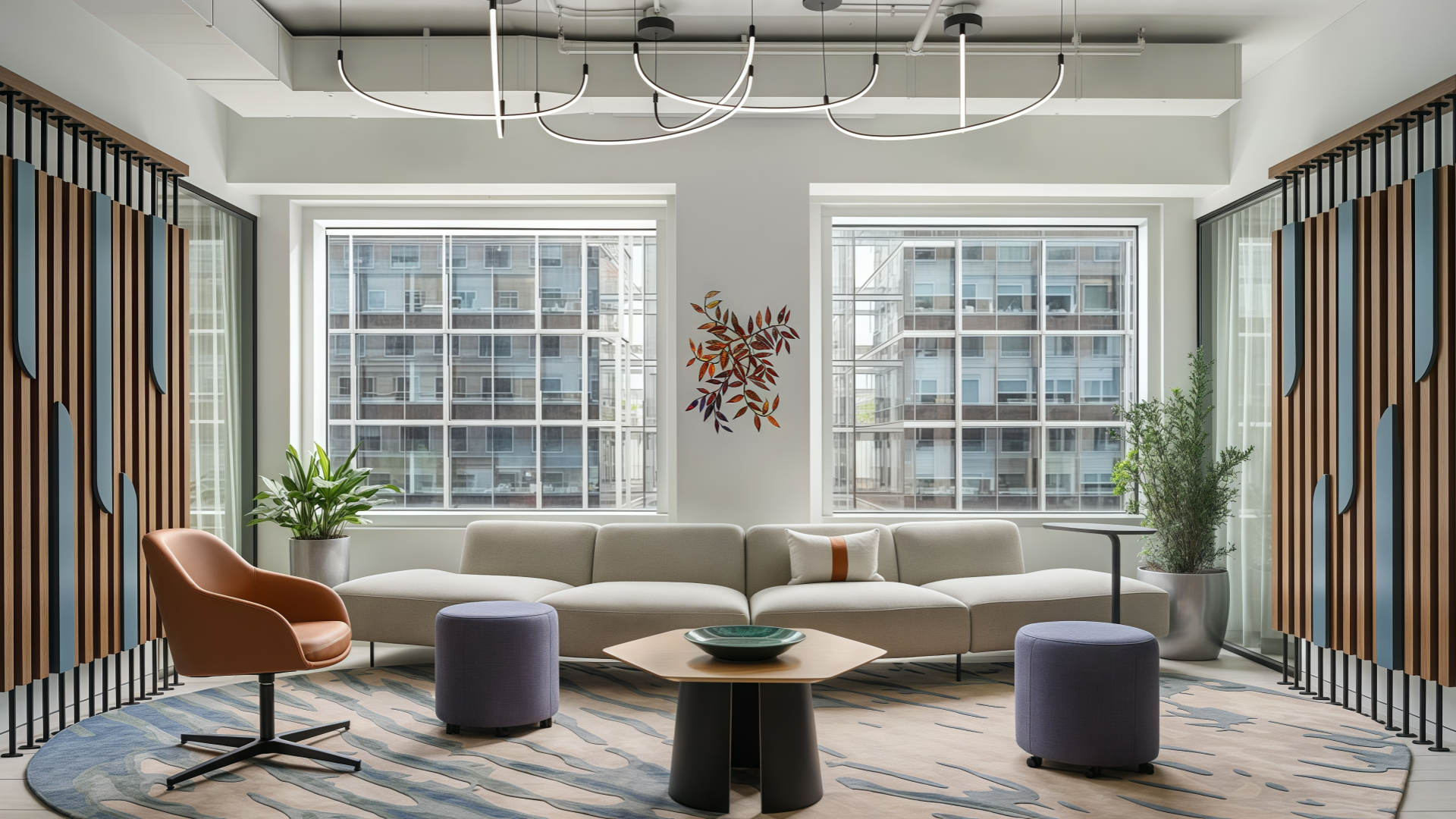
Finally, coworking‑style and community areas extend collaborative workspace ideas beyond the core office. Within corporate offices, coworking zones may be open to employees from different departments or visiting colleagues from other sites. Externally, organizations may use third‑party coworking spaces to support remote staff, temporary project teams, or partnerships with startups and external experts.
These environments are particularly valuable for managing flexible headcount and distributed teams. They can also serve as neutral “commons” where multiple organizations or business units meet, reinforcing a sense of ecosystem rather than isolated silos.

This section distills collaborative workspace ideas into a high‑level design framework that interior designers and corporate clients can use to assess, brief, or plan new environments.
Layout and zoning
Start by defining the overall spatial strategy: will the office lean toward open layouts, a hybrid mix of open and enclosed rooms, or a fully activity‑based model?
Open areas suit high‑energy, visible collaboration but need adjacent focus zones. Hybrid layouts mix open collaboration with enclosed rooms for privacy. Activity‑based models create distinct zones for brainstorming, workshops, learning, and quiet work.
Good zoning ensures collaborative spaces are close enough to be convenient, but not so central that they disrupt all other work.
Furniture and posture diversity
Use modular tables, mobile seating, lounges, and standing‑height surfaces to support different kinds of interaction. Standing tables encourage brief, focused discussions; lounge seating invites longer, more informal dialogue.
Offer multiple postures—sitting, standing, leaning, perching—to suit different bodies and energy levels throughout the day.
Furniture diversity empowers teams to choose the setting that best matches their task, which increases engagement and reduces fatigue.
Technology and power integration
Equip collaborative areas with shared screens, AV‑ready tables, and easy‑to‑reach power hubs. If people have to hunt for outlets or adapters, they will avoid using the space.
Include digital tools such as video conferencing systems and digital whiteboards where hybrid collaboration is common, so remote participants can contribute on equal footing.
Design for cable management and device storage from the start to keep surfaces tidy and safe.
Acoustic control and privacy
Combine architectural elements (acoustic ceilings, wall panels, floor finishes) with furniture solutions (soft seating, screens, acoustic pods) to manage sound levels.
Position noisy collaboration zones away from focused work areas, or separate them with buffers such as storage walls or plant screens.
Provide phone booths and small enclosed rooms so individuals can step away from open collaboration areas for confidential calls or deep focus.
Inclusivity, accessibility, and ergonomics
Ensure that collaborative workspace ideas respect universal design principles: accessible circulation widths, step‑free routes, and furniture suitable for different body types and abilities.
Consider neurodiverse needs by including calmer, less visually busy collaboration spaces with neutral lighting and limited sensory input.
Provide ergonomic seating and properly sized tables in all collaborative areas, not just in traditional meeting rooms, so people can work comfortably during longer sessions.
Design principles become real when translated into furniture and product choices. For project contractors, interior designers, and distributors, this is where collaborative workspace ideas intersect with catalogs, budgets, and lead times.
In open‑plan collaboration zones, flexibility is paramount. Modular seating that can be reconfigured, mobile whiteboards that act as both visual tools and space dividers, and tables on casters allow teams to shape their environment quickly. Screens on wheels can create temporary boundaries for breakout groups and then be rolled away when not needed.
These systems support a range of postures and session types. For example, a group might start with everyone gathered around a high table for a stand‑up scrum, then move to low lounge seating for a more reflective discussion. The same set of components can be rearranged multiple times a day, supporting high utilization and varied use.


- Hongye Office Furniture' s Showroom -
Acoustic pods, booths, and cabin systems have become an essential part of many collaborative strategies. These units provide controlled environments for confidential conversations, small team huddles, and hybrid calls where sound and visuals must be managed carefully.
Glass elements allow visual connection to the wider workspace while maintaining separation; adjustable fabrics and interior finishes can tune acoustic performance. Integrated seating, tables, lighting, and AV make these pods feel more like small rooms than pieces of furniture. For many clients, they offer a flexible alternative to building more fixed walls.
Team hubs are anchored zones that a group identifies as “their” collaboration base. They might feature high tables and stools, tiered seating for presentations, and collaboration walls covered in writable or pin‑up surfaces. Here, teams can run regular rituals—stand‑ups, reviews, retrospectives—in a consistent setting that reinforces their identity.
Work lounges, with sofas, armchairs, and coffee tables, support more informal yet purposeful collaboration. They are ideal for peer coaching, debriefs after client meetings, or cross‑team networking. Touchdown furniture—benches, counters, and small wall‑mounted tables—provides places where one or two people can quickly connect in circulation areas without booking a room.
To truly enable collaboration, furniture must be paired with the right accessories. Mobile power units allow people to gather away from fixed outlets. Monitor arms and mobile displays help teams share content in different directions. Writable partitions, flipcharts, and accessory rails keep tools within easy reach.
By planning IT, power, and accessories together with furniture, you ensure that collaborative workspace ideas are fully supported in daily use—not just during staged photoshoots on opening day.
As hybrid work becomes the norm, collaborative workspace ideas must evolve to support mixed physical and virtual collaboration. This section focuses on practical considerations for making spaces hybrid‑ready.
Video call–friendly collaboration zones
Design rooms with clear sightlines to cameras so on‑site participants can look toward remote colleagues naturally.
Use balanced lighting that avoids harsh backlight or shadows; consider dimmable fixtures and wall‑washing for a more even scene.
Treat acoustics as a first‑order concern: echo, background noise, and microphone placement all affect remote participants’ experience.
Hybrid-ready furniture choices
Specify conference tables that integrate power and AV connections neatly, avoiding cable clutter that can trip people or block cameras.
Use screen dividers or acoustic panels around key hybrid collaboration zones to reduce echo and visual distractions.
Include shared screens or digital whiteboards that both in‑person and remote participants can view and interact with.
Blending digital and physical collaboration tools
Combine analog tools—sticky notes, physical whiteboards, printed canvases—with digital platforms that capture outcomes and make them accessible after the session.
Consider cameras or apps that can digitize physical boards at the end of a workshop so remote colleagues receive the same information.
Encourage teams to standardize on a few platforms to avoid fragmentation and loss of ideas.
Policies and etiquette for hybrid collaboration
Establish clear norms: for example, everyone in a meeting uses their camera, or a single person in the room is designated as the “remote champion” to watch the chat and ensure remote voices are heard.
Implement booking rules that prevent over‑scheduling of the best hybrid rooms and encourage appropriate use of different collaboration zones.
Train employees in basic AV troubleshooting and etiquette so sessions start on time and remain inclusive.

Even the best collaborative workspace ideas must pass through the realities of budget, phasing, and implementation. For B2B stakeholders, this means designing solutions that can be delivered in stages, within financial constraints, and across multiple sites.
Collaborative zones can be delivered at different cost tiers. A budget‑friendly package might rely on standard tables, stackable chairs, and basic whiteboards, while a mid‑range solution adds modular systems, better acoustics, and integrated power. Premium implementations may include custom joinery, advanced AV, acoustic pods, and high‑end finishes.
Whatever the tier, it is important to focus on value drivers such as ergonomics, adaptability, and durability. A slightly higher upfront investment in flexible, robust furniture can reduce the need for frequent replacements or renovations, delivering better long‑term return on investment.
For larger organizations, it often makes sense to start with pilot areas. A few carefully chosen zones—such as one project room, one open collaboration area, and one hybrid meeting space—can be implemented first to test assumptions.
By measuring utilization, collecting user feedback, and observing behaviour in these pilots, workplace teams can refine standards before a wider rollout. This reduces risk, helps secure internal buy‑in, and ensures that future investments in collaborative workspace ideas are guided by real evidence rather than purely theoretical models.
Successful implementation also depends on the right ecosystem of partners. Interior designers, workplace strategists, furniture manufacturers, and distributors need to collaborate closely to select scalable solutions and establish standards that can be replicated across locations.
Maintenance and refresh cycles should be planned from the outset. Soft furnishings, high‑touch surfaces, and technology will need periodic updates; planning for this avoids surprises down the line. Training employees to use and care for collaborative environments—moving furniture safely, managing cables, respecting acoustics—helps protect the investment and sustain performance over time.

Collaborative workspace ideas are no longer optional add‑ons; they are central to how modern organizations innovate, learn, and build culture. By combining project rooms, huddles, lounges, coworking‑style zones, and hybrid‑ready environments—each supported by the right furniture, technology, and acoustic strategies—you can substantially improve team performance, employee engagement, and overall productivity.
For interior designers, corporate leaders, project contractors, and distributors, the key is to treat collaborative spaces as a coherent ecosystem rather than a collection of isolated “cool areas.” When the mix of space types is intentional, aligned with work patterns, and supported by suitable products, user adoption rises, utilization improves, and the business case for investment becomes clearer.
As a trusted industry leader in modern workplace furniture and solutions, Hongye Furniture can help you translate these collaborative workspace ideas into concrete, scalable environments—whether you are outfitting a single pilot zone or rolling out a multi‑site strategy. To move forward, you can reach out to Hongye Furniture to request project‑specific recommendations, explore curated collaboration furniture collections and pods, or download planning tools that support your next fit‑out or refurbishment. By partnering with a responsible, compliance‑focused manufacturer, you ensure that your collaborative workspaces are not only inspiring, but also durable, ergonomic, and ready for the future of work.
No.1 Section, Heshan Industrial City, Heshan, Jiangmen, Guangdong, China
+86-133-9221-7708
Mon - Sat: 8 AM - 6PM
Sun: 11 AM - 3 PM